Image:CocoaNav icon.png

PARMANOIR

Changing the background color of an NSButton

If you want to color or visually change one of your controls, the easiest way to do it is with Core Image. In Interface Builder, click wants Core Animation Layer, and add content filters.
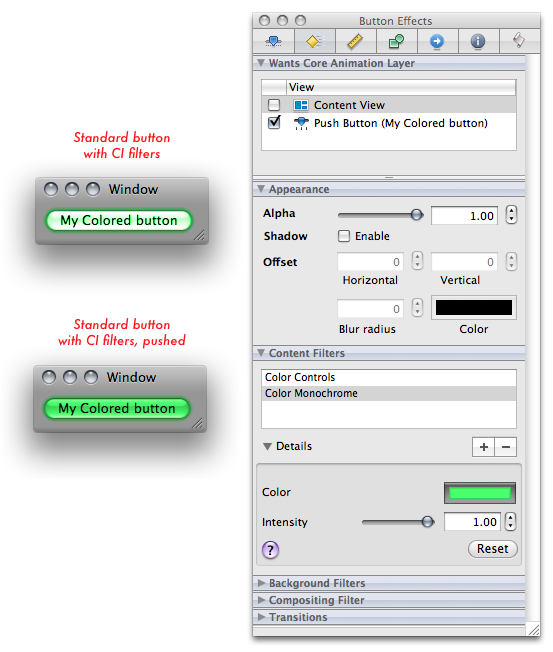
Image:Changing background color of NSButton.png

This one uses Color Monochrome to color the button. In Dynamic overloading : sample code, I used Color Matrix but strangely it's not available in my version of IB. Well, you can always set it up in code. It's better than overloading all NSButtons' drawRect — that's quite overkill to color just one button. :)

2008 07 25Where in build phases is that file ?
2008 07 192Imagine clickable error messages
2008 07 18Succulent Stormhoek
2008 07 173Loving the for
2008 07 12(Parmanoir) Feed now validates
2008 07 108Telling classes from instances
2008 07 08Comma Trick
2008 07 06Using libffi
2008 07 04BridgeSupport's type and type64
2008 07 042Clickable Disabled MenuItems
2008 07 026Less bugs through compiler optimizations
2008 06 251CocoaNav JS, a light CocoaNav for Safari
2008 06 232NSWindow goodies : bottomCornerRounded, usesLightBottomGradient
2008 06 222Inspecting NSUndoManager's undo stack
2008 06 16Cocoa Regular Expressions via JavascriptCore
2008 06 15Crossing the WebKit bridge
2008 06 08Double and Triple Click
2008 06 05Photoshop-like compositing with Core Animation
2008 06 052One way binding to NSSlider
2008 05 30Threaded Core Animation, Part Deux
Image:rss.png
Image:rss.png

Powered by MediaWiki

Hi ! I'm learning Cocoa to (hopefully !) become an indie developer.

I've written software all my professional life, in C++, PHP, Javascript. I've designed websites and web interfaces. My last venture went into flames as clients were happy but didn't like paying very much.

I've had little luck in the B2B world, I'm hoping for a better future writing Mac applications.

Planet Cocoa