

2011 02 22Distance field

This picture is computed using the Meijster algorithm, which works in linear time and computes several kinds of distance functions. Plus, it's simple enough to be implemented in html !
See the canvas implementation or get the code on Github. 2010 07 20Binding through NSApp2
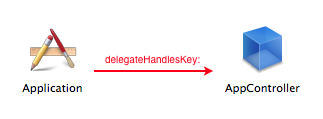
AppleScript offers a delegate method for NSApp to handle custom keys. That's how you can ask iTunes the name of current track, even though there's no such key in NSApplication — it's made available through application:delegateHandlesKey:
Good news is, you don't have to use AppleScript to enjoy the benefits of extra keys ! NSApp can become a way of sharing instances across NIBs, or a central repository of data.
How ?
First, declare the keys we're using in an array and allocate a dictionary to store their values :
@implementation ApplicationController
- (id)init
{
	self = [super init];
	if (!self)
		return nil;

	// A NSMutableArray recording keys we're using
	handledKeys = [[NSMutableArray alloc] initWithObjects:@"myCustomKey", @"anotherKey", @"etc", nil];
	// A NSMutableDictionary storing our custom keys' values
	appDict = [NSMutableDictionary new];

	return self;
}
Then, tell NSApp what keys we're handling :
- (BOOL)application:(NSApplication *)sender delegateHandlesKey:(NSString *)key
{
	return [handledKeys containsObject:key];
}
Finally, implement get and set methods for our keys. Don't bother writing accessors, just implement those in the fallback KVC methods :
- (id)valueForUndefinedKey:(NSString *)key
{
	return [appDict valueForKey:key];
}
- (void)setValue:(id)value forUndefinedKey:(NSString *)key
{
	// Notify change will happen
	[NSApp willChangeValueForKey:key];
	[appDict setValue:value forKey:key];
	// Notify change did happen
	[NSApp didChangeValueForKey:key];
}
Binding in Interface Builder
Once your delegate handles custom keys, bind in Interface Builder like this :
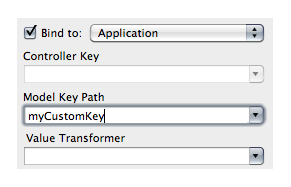
Update the key with [NSApp setValue:@"hello" forKey:@"myCustomKey"].
Binding manually
For custom controls, call bind like this :
[myControl bind:@"controlKeyPath" toObject:NSApp withKeyPath:@"myCustomKey" options:nil];
Binding or sharing data across NIBs
Binding to NSApp using mainWindow.windowController.document will give access to the current document. To implement an inspector, load an external NIB and bind to that keyPath. Another way is to set a custom key : when selecting an object, update a key containing the selected object [NSApp setValue:selectedObject forKey:@"selectedObject"] and bind the inspector to it.
Using keypaths
To work for keypaths, that is container.values.leafValue instead of just myCustomKey, first create containers :
// Create containers for leaf keys
[NSApp setValue:[NSMutableDictionary dictionary] forKey:@"container"];
[NSApp setValue:[NSMutableDictionary dictionary] forKeyPath:@"container.values"];
Then bind and update just as you would a key :
// Bind
[myControl bind:@"controlKeyPath" toObject:NSApp withKeyPath:@"container.values.leafValue" options:nil];

// Then update model value and watch it change everywhere it's bound
[NSApp setValue:@"Hello !" forKeyPath:@"container.values.leafValue"];
2010 05 12Forwarding invocations2
First, decide in methodSignatureForSelector: whether to handle the call or not. If so, you'll need to return a signature describing arguments and return type of the method you'll call in place of the unknown one. To discard the call, just return nil. The signature itself is made up of type encodings, but you don't have to deal with those directly as you can use methodSignatureForSelector: to return the signature of the method you'll actually call.
Then, handle the call in forwardInvocation:. The NSInvocation given as parameter gives you the original selector and its arguments. As a Cocoa method is actually a C function taking instance and selector as its first arguments, the unknown method's arguments actually start from the third argument.
Sample code time ! Here's a standard mutable dictionary ...
id dict = [NSMutableDictionary dictionaryWithObjectsAndKeys:
			@"John", @"name",
			[NSNumber numberWithInt:47], @"age",
			nil];
... that you can get and set on with valueForKey: and setValue:forKey:. As it's a bit verbose, let's use forward invocation to masquerade accessors :
// Call non existent getter - (id)age
NSLog(@"age=%@", [dict age]);
// Set a new age using a non existent setter - (void)setAge:(id)newAge
[dict setAge:[NSNumber numberWithInt:48]];
To accomplish this, we'll add forward invocation to NSDictionary to redirect zero parameter calls to call valueForKey: and one parameter calls (starting with set) to setValue:forKey:.
@implementation NSDictionary (ForwardInvocation)

// Determine if we can handle the unknown selector sel
- (NSMethodSignature *)methodSignatureForSelector:(SEL)sel
{
	id	stringSelector = NSStringFromSelector(sel);
	int	parameterCount = [[stringSelector componentsSeparatedByString:@":"] count]-1;

	// Zero argument, forward to valueForKey:
	if (parameterCount == 0)
		return [super methodSignatureForSelector:@selector(valueForKey:)];

	// One argument starting with set, forward to setValue:forKey:
	if (parameterCount == 1 && [stringSelector hasPrefix:@"set"])
		return [super methodSignatureForSelector:@selector(setValue:forKey:)];

	// Discard the call
	return nil;
}

// Call valueForKey: and setValue:forKey:
- (void)forwardInvocation:(NSInvocation *)invocation
{
	id	stringSelector = NSStringFromSelector([invocation selector]);
	int	parameterCount = [[stringSelector componentsSeparatedByString:@":"] count]-1;

	// Forwarding to valueForKey:
	if (parameterCount == 0)
	{
		id value = [self valueForKey:NSStringFromSelector([invocation selector])];
		[invocation setReturnValue:&value];
	}
	// Forwarding to setValue:forKey:
	if (parameterCount == 1)
	{
		id value;
		// The first parameter to an ObjC method is the third argument
		// ObjC methods are C functions taking instance and selector as their first two arguments
		[invocation getArgument:&value atIndex:2];

		// Get key name by converting setMyValue: to myValue
		id key = [NSString stringWithFormat:@"%@%@",
				[[stringSelector substringWithRange:NSMakeRange(3, 1)] lowercaseString],
				[stringSelector substringWithRange:NSMakeRange(4, [stringSelector length]-5)]];

		// Set
		[self setValue:value forKey:key];
	}
}

@end
The downside of this sample is that XCode will complain about unknown methods. Nonetheless, it's nice to see that you can do it. 2010 02 27Core Image black fringes2
CIImage with [CIImage imageByApplyingTransform:t], you'll see incorrect blending between the image and its background. In this case, a black and grey image on a red background shows darker interpolated pixels than exist in both image and background.
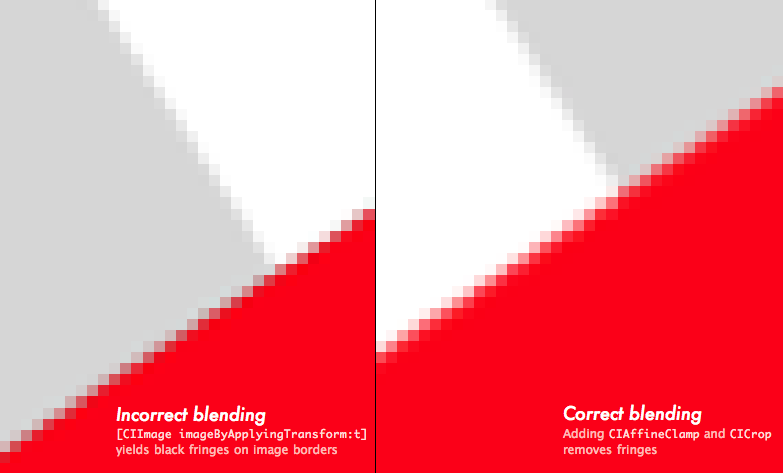
Core Image is by default assuming a black border when blending the image. CIAffineClamp mentions black fringes when using a Gaussian Blur — when blurring, Core Image will blend border pixels with black. Adding CIAffineClamp will extend the image infinitely to blur border pixels with a copy of themselves.
CIAffineClamp — this will remove black borders in CICrystallize, CIPointillize, … and all the blur filters. 2010 02 21Quickest Way to Shell
NSTask to run subprocesses. It can be used to run shell scripts, but all this manual pipe and file handling is a bit cumbersome. Fortunately, for a simple script, we can use the trusty old system and redirect its result to a file.
Here's a quick way to get the path to the last crash report of your app :
// We'll save the result in a temp file
NSString* tempFilePath = [NSString stringWithFormat:@"%@/MyApplicationLastCrash.txt", NSTemporaryDirectory()];

// Run the shell script
NSString* script = [NSString stringWithFormat:
  @"ls -1t /Users/mini/Library/Logs/CrashReporter/* | grep /MyApplication | head -1 | tr -d '\n' >%@", tempFilePath];
system([script UTF8String]);

// Returns path to last crash report or empty string ( [lastCrash length == 0] )
NSString* lastCrash = [NSString stringWithContentsOfFile:tempFilePath encoding:NSUTF8StringEncoding error:nil];
In this case,
ls lists all crash reports from new to old, grep keeps only yours, head and tr extract the result by keeping the first line and removing the trailing newline. Getting the path is now only a matter of reading the temp file. 2010 02 08Who's calling ?
NSThread's callStackSymbols will dump the call stack in an array. What is usually the realm of gdb, callStackSymbols will do at runtime.
Here's how it looks called during awakeFromNib :
0   MyApp          -[MyAppDelegate awakeFromNib] + 44
1   CoreFoundation -[NSSet makeObjectsPerformSelector:] + 205
2   AppKit         -[NSIBObjectData nibInstantiateWithOwner:topLevelObjects:] + 1445
3   AppKit         loadNib + 226
4   AppKit         +[NSBundle(NSNibLoading) _loadNibFile:nameTable:withZone:ownerBundle:] + 248
5   AppKit         +[NSBundle(NSNibLoading) loadNibNamed:owner:] + 326
6   AppKit         NSApplicationMain + 279
When are bindings calling your code ? Walk up the callstack and look for NSBinder :
0   MyApp      -[MyAppDelegate setSliderValue:] + 67
1   Foundation _NSSetIntValueAndNotify + 256
2   Foundation -[NSObject(NSKeyValueCoding) setValue:forKey:] + 434
3   Foundation -[NSObject(NSKeyValueCoding) setValue:forKeyPath:] + 240
4   AppKit     -[NSBinder _setValue:forKeyPath:ofObject:mode:validateImmediately:raisesForNotApplicableKeys:error:] + 264
5   AppKit     -[NSBinder setValue:forBinding:error:] + 266
6   AppKit     -[NSValueBinder _applyObjectValue:forBinding:canRecoverFromErrors:handleErrors:typeOfAlert:discardEditingCallback:otherCallback:callbackContextInfo:didRunAlert:] + 197
7   AppKit     -[NSValueBinder applyDisplayedValueHandleErrors:typeOfAlert:canRecoverFromErrors:discardEditingCallback:otherCallback:callbackContextInfo:didRunAlert:] + 567
8   AppKit     -[NSValueBinder performAction:] + 300
9   AppKit     -[_NSBindingAdaptor _objectDidTriggerAction:bindingAdaptor:] + 136
10  AppKit     -[NSControl sendAction:to:] + 63
11  AppKit     -[NSCell trackMouse:inRect:ofView:untilMouseUp:] + 1715
12  AppKit     -[NSSliderCell trackMouse:inRect:ofView:untilMouseUp:] + 1053
13  AppKit     -[NSControl mouseDown:] + 624
14  AppKit     -[NSWindow sendEvent:] + 5409
15  AppKit     -[NSApplication sendEvent:] + 4719
16  AppKit     -[NSApplication run] + 474
17  AppKit     NSApplicationMain + 364
Writing recursive code and stuck with a method definition that does not specify the recursion depth ? Count how many times the method appears in the call stack.
If you have a dummy NSLog that you want gone but can't find among the legit ones, add this to your precompiled header :
#define NSLog(args...) NSLog(args), NSLog(@"%@", [NSThread callStackSymbols])It will call the original
NSLog and pinpoint the offending function. 2009 09 218 ways to use Blocks in Snow Leopard3
1 Custom sorting To sort an NSArray in a custom way, you need to write a new method and pass its selector to the sorting function. With blocks, just sort in-place :
id sortedArray = [myArray sortedArrayUsingComparator:
	^(id a, id b)
	{
		if (a.someValue > b.someValue && a.otherValue > b.otherValue) return NSOrderedAscending;
		... some more sorting code
	}];
2 Enumeration Looking for an object in an array can be done with a block enumerator. Set stop to YES to stop enumeration.
[myArray enumerateObjectsUsingBlock:^(id obj, NSUInteger idx, BOOL *stop)
	{
		NSLog(@"obj %@", obj);
		if (...terminatingCondition...)	*stop = YES;
	}];
This is the least interesting use of blocks. The for .. in is much more readable :
for (id obj in myArray)
{
	if (...terminatingCondition...) break;
}
The one advantage enumerateObjectsUsingBlock: has is the current index. enumerateObjectsWithOptions:usingBlock: lets you go backwards.
3 Just-this-scope functions You need to call a piece of code multiple times but don't feel like adding a new method to your class just to accomplish this one task. For instance, protocol_copyMethodDescriptionList(protocol, isRequired, isInstance, count) needs multiple calls to enumerate all protocol methods. Instead of creating a new method, use a block :
- (void)enumerateProtocolMethods:(Protocol*)p
{
	// Custom block, used only in this method
	void (^enumerate)(BOOL, BOOL) = ^(BOOL isRequired, BOOL isInstance) {
		unsigned int descriptionCount;
		struct objc_method_description* methodDescriptions =
				protocol_copyMethodDescriptionList(p, isRequired, isInstance, &descriptionCount);
		for (int i=0; i<descriptionCount; i++)
		{
			struct objc_method_description d = methodDescriptions[i];
			NSLog(@"Protocol method %@ isRequired=%d isInstance=%d",
				NSStringFromSelector(d.name), isRequired, isInstance);
		}
		if (methodDescriptions)	free(methodDescriptions);
	};
	// Call our block multiple times with different arguments
	// to enumerate all class, instance, required and non-required methods
	enumerate(YES, YES);
	enumerate(YES, NO);
	enumerate(NO, YES);
	enumerate(NO, NO);
}
4 Common cleanup I trust we've all done this :
- (id)veryFragileDaisyChain
{
	... init 1
	if (condition1) {
		... init 2
		if (condition2) {
			... init 3
			if (condition3) {
				... init 4
				if (condition4) {
					// At last ! Our shiny new object !
				}
				... init 3 cleanup
			}
			... init 2 cleanup
		}
		... init 1 cleanup
	}
}
How about a block ?
- (id)veryFragileDaisyChain
{
	// Let's declare everything in advance
	__block id obj1 = nil, obj2 = nil, obj3 = nil;
	// Cleanup block
	void(^cleanup)() = ^{
		if (obj3)	... cleanup
		if (obj2)	... cleanup
		if (obj1)	... cleanup
	};

	// Onward.
	... init code 1
	if (!condition1)	return cleanup(), nil;

	... init code 2
	if (!condition2)	return cleanup(), nil;

	... init code 3
	if (!condition3)	return cleanup(), nil;

	... init code 4
	if (!condition4)	return cleanup(), nil;

	// Done.
	return shinyNewObject;
}
5 Functional style Nicolas seriot wrote about functional code in ObjC before Snow Leopard was out, hinting at using blocks to implement functional style code in ObjC. Strangely enough, Snow Leopard didn't implement these. NSArray does have a indexesOfObjectsPassingTest: method, but it returns a NSIndexSet instead of an array ?! With blocks, we can implement a filter method that will create a new array collecting objects matching our block condition.
@implementation NSArray(FunctionalStyle)
- (NSArray*)filter:(BOOL(^)(id elt))filterBlock
{
	// Create a new array
	id filteredArray = [NSMutableArray array];
	// Collect elements matching the block condition
	for (id elt in self)
		if (filterBlock(elt))	[filteredArray addObject:elt];
	return	filteredArray;
}
@end
This removes the need to loop over array element ourselves when we only want to extract elements. Just supply a condition and voilà ! A new array.
// Return a new array containing elements greater than 4
id filteredArray = [myArray filter:^(id elt)	{
			return [elt intValue] > 4;
		}];
6 List comprehensions are a shorthand way of creating arrays.
// This shorthand Javascript
var s = [2*i for (i in 100) if (i*i>3)]
// is equivalent to
var newArray = []
for (var i=0; i<100; i++)
	if (i*i>3) newArray.push(2*i)
We can implement the same with blocks, just a little more verbosely :
@implementation NSArray(ListComprehensions)
// Create a new array with a block applied to each index to create a new element
+ (NSArray*)arrayWithBlock:(id(^)(int index))block range:(NSRange)range
{
	id array = [NSMutableArray array];
	for (int i=range.location; i<range.location+range.length; i++)
		[array addObject:block(i)];
	return	array;
}
// The same with a condition
+ (NSArray*)arrayWithBlock:(id(^)(int index))block range:(NSRange)range if:(BOOL(^)(int index))blockTest
{
	id array = [NSMutableArray array];
	for (int i=range.location; i<range.location+range.length; i++)
		if (blockTest(i))		[array addObject:block(i)];
	return	array;
}
@end
Then call with a block and a range, and an optional condition :
// Just block and range
id newArray = [NSArray
	arrayWithBlock:^(int i) {	return [NSNumber numberWithInt:i*2]; }
	range:NSMakeRange(5, 10)];

// Optional condition : keep only multiples of 3
id newArray = [NSArray
	arrayWithBlock:^(int i) {	return [NSNumber numberWithInt:i*2]; }
	range:NSMakeRange(5, 10)
	if:^(int i) { return i%3 == 0; } ];
7 Async processing This is a simple piece of Grand Central Dispatch : enqueue an asynchronous job. The function will return immediately while the block performs in the background in another thread. Use performSelectorOnMainThread: to update your GUI afterwards.
dispatch_queue_t queue = dispatch_get_global_queue(DISPATCH_QUEUE_PRIORITY_DEFAULT, 0);
dispatch_async(queue, ^{

	// Some looong computation in here ...

	// [NSThread isMainThread] tells us that calling [self taskDone] is done with the dispatch thread
	// Use this to call our end of job notification on the main thread
	[self performSelectorOnMainThread:@selector(taskDone) withObject:nil waitUntilDone:NO];
	});
8 Async monitoring Another piece of GCD, lifted from the Concurrency Programming Guide.
You can use GCD to monitor asynchronously resources. In this example, a dispatch source is set to watch when a file is renamed. One block handles notification, another handles common cleanup.
// Create a dispatch source and start watching it
- (dispatch_source_t)watchFileRename:(NSString*)fileName
{
	int fd = open([fileName UTF8String], O_EVTONLY);
	if (fd == -1)	return NULL;
	[fileName retain];

	// Cleanup block
	void(^cleanup)() = ^{
		close(fd);
		[fileName release];
	};

	// Create source
	dispatch_source_t source = dispatch_source_create(DISPATCH_SOURCE_TYPE_VNODE,
		fd, DISPATCH_VNODE_RENAME,
		dispatch_get_global_queue(DISPATCH_QUEUE_PRIORITY_DEFAULT, 0));
	if (!source)  return cleanup(), NULL;

	// Dispatch source handler
	dispatch_source_set_event_handler(source, ^{
		// *** Async event handler ***
		// Called when the file was renamed.
	});
	// Dispatch source destructor
	dispatch_source_set_cancel_handler(source, ^{ cleanup(); });
	// Start watching
	dispatch_resume(source);
	return	source;
}

// Release a dispatch source
- (void)releaseDispatchSource:(dispatch_source_t)source
{
	if (!source)	return;
	dispatch_source_cancel(source);
	dispatch_release(source);
}

// Start watching file rename. Call releaseDispatchSource when done.
dispatch_source_t source = [self watchFileRename:@"/FileToWatch"];
There are even more uses of blocks, as Grand Central Dispatch uses them extensively to perform concurrent tasks. I encourage you to read the Concurrency Programming Guide.