

2008 03 28Bindings, Outlets, Target+Action across multiple NIBs
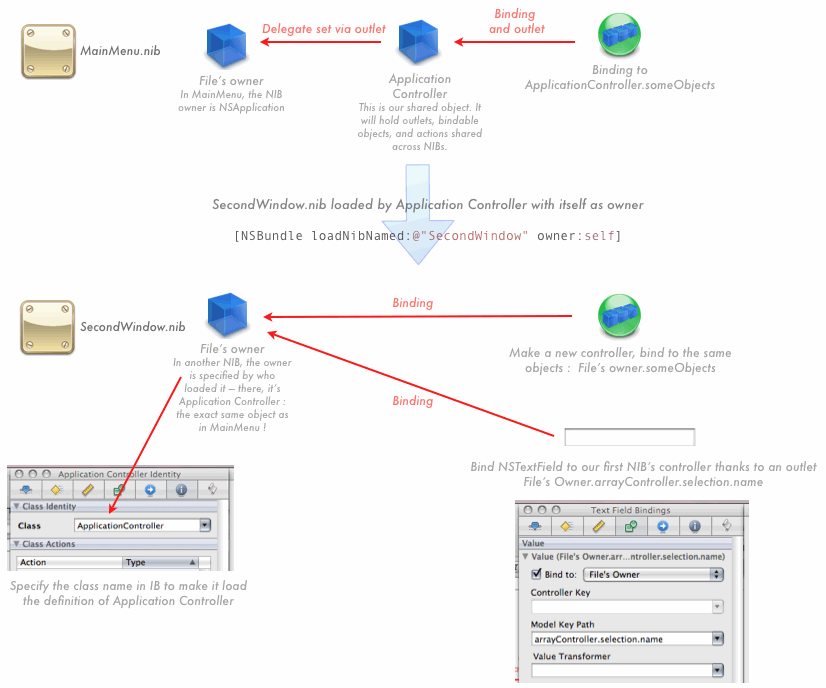
How does a NIB work anyway ? Cocoa defines classes (NSWindow, NSTextField), you define classes in your application (ApplicationController, SomeObject). A NIB is a collection of instances of these classes. Adding Windows, custom objects (like ApplicationController), or controllers is just like calling [[SomeClass] alloc] init] — but the NIB will do it for you.
To be useful, these instances must be linked to an existing object — the File's Owner. When loading a NIB, you specify that object as a parameter : [NSBundle loadNibNamed:@"SecondWindow" owner:self].
If you have only one NIB, you don't have to do a thing — loading will be automatic and the File's Owner will be NSApplication. That's how you can link an instance of your ApplicationController to the delegate outlet of File's Owner, which is the running NSApplication.
But if you have multiple NIBs, that owner is your way to share data. Using ApplicationController as owner is like having that blue box in our first NIB — but it has a different name. And you use it just the same : you can bind to ApplicationController's data, define outlets and actions using that File's owner object which is in fact your ApplicationController.
Watch those outlets
If you put your Preferences window in another NIB and define an outlet to it in ApplicationController, it will be initialized only when you load the NIB. Yes, that's obvious for something like the preferences window — but it might not be for whatever else you do. When you load a NIB at runtime, bindings and outlets are setup just then : the first NIB has no idead about the second one.
If you load a NIB multiple times, it will create a new copy of your NIB's objects each time. This is what happens with NSDocument : you get a fresh copy of your window defined in IB. If your NIB defines an outlet to ApplicationController, it will be overwritten with the new copy at each load. Be careful there.
 NibRuntimeLoad.zip
Cocoa Bindings
- WebViewControl Sample code for custom bindings : binding Cocoa to an html page

- Establishing manual Cocoa Bindings Bindings in a custom NSView
- Custom cocoa bindings What I'd like to see in IB to setup custom bindings
- Bindings via KVC only In Leopard, your properties are bindable without any extra work
- Bindings, Outlets, Target+Action across multiple NIBs
